Charging alert
Receive an iPhone notification when Apple Watch is charging and the available update reaches your chosen level.
How-to
Yes. Apple’s Batteries widget shows the charge level of your connected Apple Watch on iPhone, and it is the right place to start. Juice Watch adds a different kind of context: the last Apple Watch battery level your iPhone received and the time it arrived, plus charging and low-battery notifications at levels you choose.
Native Apple option
Apple’s native option is the Batteries widget on iPhone. Apple’s battery guide for Apple Watch says you can add a battery widget on iPhone to show the charge level of a connected Apple Watch. Apple’s iPhone User Guide says a Home Screen widget can monitor the battery levels of iPhone and connected accessories.
Put the Batteries widget on the Home Screen, or use the Lock Screen Batteries widget when that placement is available. This native route is the first answer when you only need to check Apple Watch charge from iPhone.
Juice Watch on iPhone
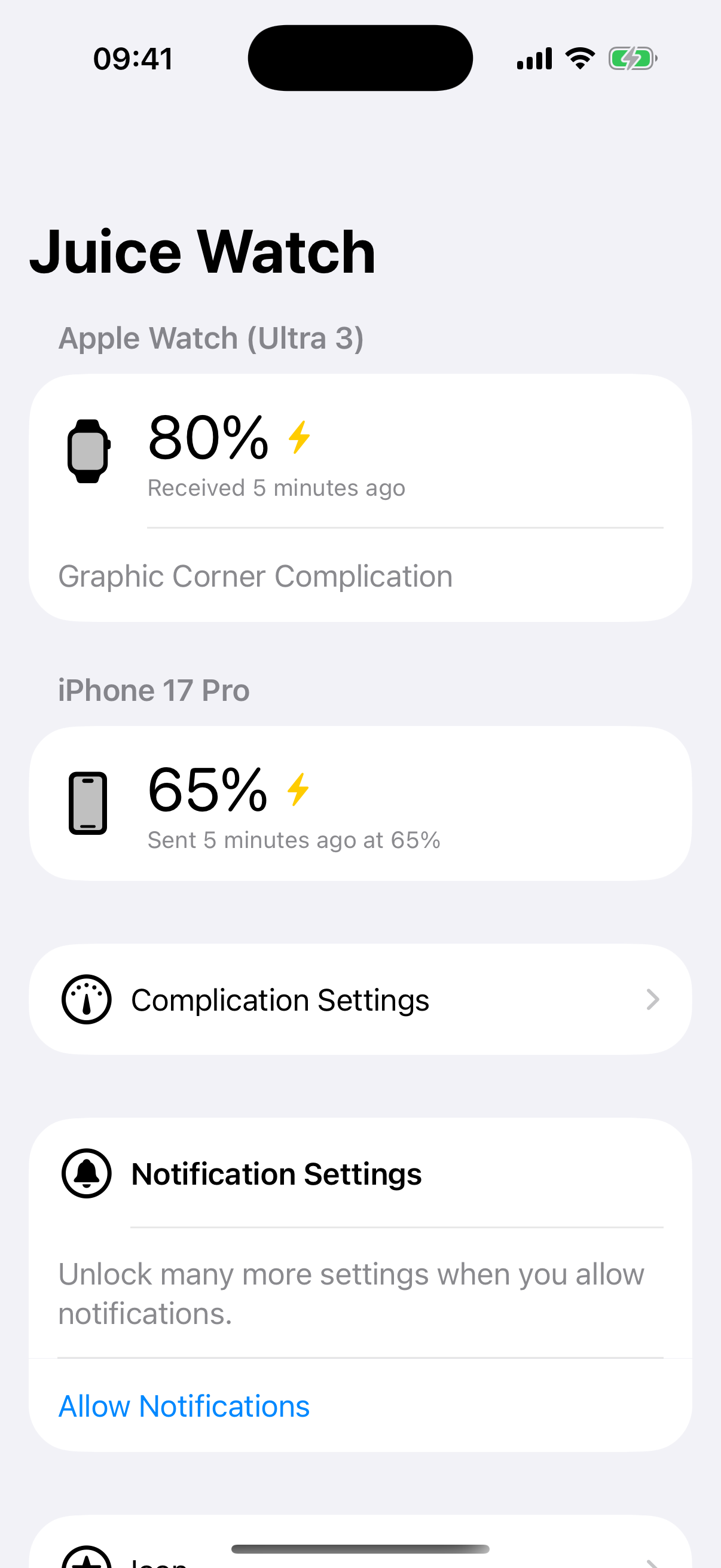
Juice Watch is an iPhone and Apple Watch battery app that shows iPhone battery status on Apple Watch, shows the last known Apple Watch battery on iPhone, and sends configurable charging and low-battery notifications.
The iPhone app shows the last Apple Watch battery level received from the companion app and when it arrived. That last-received context helps distinguish a fresh-looking number from a value that is waiting for the next background update.
For the broader set of complications, paired-device status, and alert options, read the Juice Watch features page.
Battery alerts
Juice Watch can notify iPhone when Apple Watch battery crosses levels you choose. Charging alerts use a selected threshold from 50 to 100 percent for each supported device. Low-battery alerts use the level you choose.
Receive an iPhone notification when Apple Watch is charging and the available update reaches your chosen level.
Receive an iPhone notification when the latest Apple Watch battery update reaches the low level you chose.
A notification can reflect a later reading if the system delivers the next update after the battery moved past the threshold.
Update timing
Updates are periodic. They typically arrive every 5 to 60 minutes because iOS and watchOS schedule background work. Starting with iOS 17 and watchOS 10, third-party apps receive battery values rounded to the nearest 5 percent, and Juice Watch displays the system-provided value. Charging state is shown when it is included with an update.
Keep both apps installed, leave Background App Refresh enabled, and allow notifications for the alerts you select. If updates need attention, use Juice Watch support. If you want the reverse direction, read how to see iPhone battery on Apple Watch.
FAQ
Use Apple’s Batteries widget first. Apple says the iPhone widget can show the charge level of your connected Apple Watch, and the iPhone User Guide says a Home Screen widget can monitor iPhone and connected accessory battery levels. Juice Watch is useful when you also want history context and alerts.
Juice Watch shows the last Apple Watch battery level received by the iPhone app and when that value arrived. That last-received context is different from Apple’s widget view. It helps you understand whether the visible Watch battery value is recent or waiting for the next background update.
Yes. Juice Watch can send an iPhone notification when Apple Watch is charging and reaches a level you choose from 50 to 100 percent. It can also send a low-battery alert at your chosen level. Those alerts are evaluated against available updates from iOS and watchOS.
A notification can arrive after your selected level because Juice Watch works with periodic battery updates. If the next available reading arrives after Apple Watch has charged or drained beyond the threshold, the notification reflects that later value. The app does not promise a fixed refresh interval.
Yes. That is the reverse direction: Juice Watch can show iPhone battery status on Apple Watch. On supported styles, the dual-battery complication can put one device as the number and the other as the gauge. The companion page covers the full iPhone-on-Watch answer.
Apple’s battery guide says to add a battery widget on your iPhone to show the charge level of your connected Apple Watch. Put the Batteries widget on the Home Screen, or use the Lock Screen Batteries widget when that placement is available. Juice Watch does not replace that widget. It adds the time each reading arrived and the alert levels you choose.
Apple describes the widget as showing your connected Apple Watch, so a Watch that is not currently connected to iPhone may not appear in it. Check that the Watch is paired and in range. Juice Watch keeps showing the last Apple Watch battery level the iPhone app received and the time it arrived, so you can tell how old the value is.
Reviewed September 12, 2026.
Ready to get started?
Download Juice Watch to see the last Apple Watch battery received on iPhone and choose useful alert levels.